![branding-blue-tagline.svg]](https://info.vueops.com/hubfs/Imported%20images/branding-blue-tagline.svg)
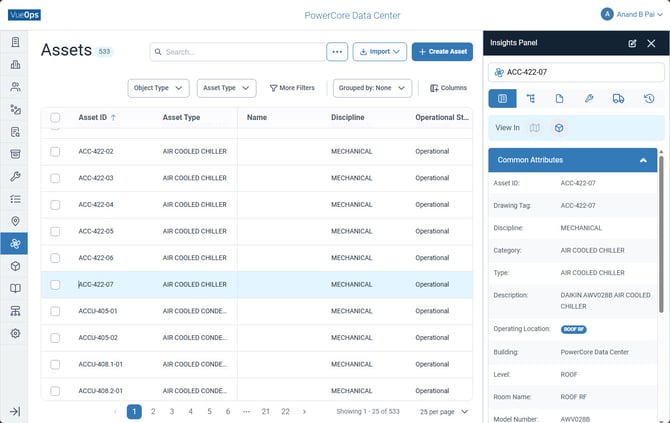
When you view or create an asset, the following attributes define it:
Identification
-
Asset ID (unique identifier, e.g., ACC-422-07)
-
Drawing Tag
-
GUID (globally unique identifier)
-
Barcode
-
Serial Number
Classification
-
Discipline (e.g., MECHANICAL, PLUMBING, ELECTRICAL)
-
Category (e.g., AIR COOLED CHILLER, WATER HEATER)
-
Type (asset type classification)
-
Classification (e.g., BUILDING)
-
Object Type (Asset, Component, Part, Meter)
Location
-
Building (e.g., PowerCore Data Center)
-
Level (e.g., ROOF, LEVEL 1)
-
Room Name (e.g., ROOF RF)
-
Operating Location (specific operational position)
Equipment Details
-
Manufacturer (e.g., DAIKIN)
-
Model Number (e.g., AWV028B)
-
Description (e.g., DAIKIN AWV028B AIR COOLED CHILLER)
Status & Health
-
Operational Status (e.g., Operational, Non-Operational, Decommissioned)
-
Asset Health (condition assessment)
-
Asset Criticality (see below)
BIM References
-
Model Name (ID) — Links to BIM model (e.g., "Mechanical & Plumbing PowerCore.nwd")
-
BIM Model ID
-
Project Name (ID)