![branding-blue-tagline.svg]](https://info.vueops.com/hubfs/Imported%20images/branding-blue-tagline.svg)
The panel has 5 tabs:
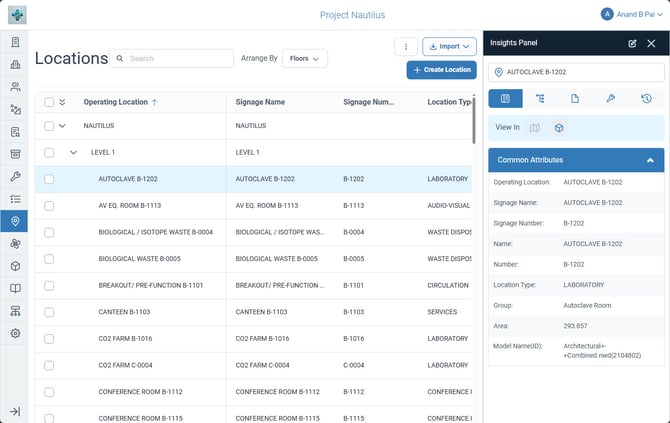
The Location Insights Panel showing Common Attributes and linked documents for a selected location.
Common Attributes Tab
Displays the location's properties at a glance:
-
Operating Location name
-
Signage Name and Signage Number
-
Name and Number
-
Project Name (ID)
Relationship Tab
Shows the location's position in the hierarchy:
-
Parent location
-
Child locations nested under this location
Documents Tab
Provides direct access to all facility documents linked to this location. Same sub-views and categories as the Asset Insights Panel:
-
Sub-views: Type | 2D | 3D | Attachments | All
Document Categories:
-
Drawings - Floor plans, mechanical/electrical plans for this area, piping plans, grounding plans
-
O&M Manuals - Operation and maintenance documentation relevant to this location
-
Specification - Specifications for systems in this area
-
Submittals - Shop drawings and product data for equipment in this location
This is particularly powerful for location-specific work - technicians can access all relevant floor plans, electrical diagrams, and equipment schedules for the exact room they're working in.
Related Tickets Tab
Shows all tickets (Work Orders, Service Requests, Warranties, Programs) that are linked to this location. Helps teams:
-
See what work is currently scheduled for a location
-
Review historical maintenance in this area
-
Verify if reported issues have been addressed
History Tab (Audit Log)
A complete record of every change made to the location:
-
Timestamp of each change
-
Which field was modified
-
Who made the change
-
Old value → New value