![branding-blue-tagline.svg]](https://info.vueops.com/hubfs/Imported%20images/branding-blue-tagline.svg)
Attaching Procedures to Work Orders
Procedures can be attached to work orders, sub-work orders, and programs:
-
From a Work Order - Navigate to the Procedures tab and click "Attach Procedure" to select from your procedure library.
-
From a Program - Navigate to the Procedures tab to attach a procedure that will be included with every generated work order.
-
From Sub-Work Orders - Each sub-work order can have its own procedure attached, allowing different tasks for different assets.
💡 TIP: Attach procedures to sub-work orders within a program to ensure every technician follows the same steps for recurring maintenance on each asset.
Viewing and Managing Procedures
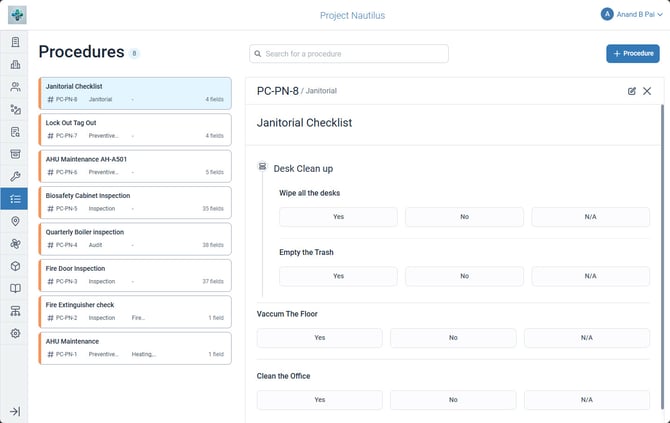
The Procedures module displays all procedures in a card-based list view:
-
Each card shows the procedure title, code, type, and total field count.
-
Use the search bar to find procedures by name.
-
Click any procedure to view its full detail in the right panel.
-
The detail panel shows all sections and fields in their structured layout.